

Your completed trades. In your journal. Automatically.
Connect MetaTrader 4 or MetaTrader 5 to Grayrock with a one-time secure code. Your completed trades are synchronized automatically—without giving Grayrock your broker password and without granting any trading permission.
- MT4 and MT5
- Live and demo accounts
- Read-only by design
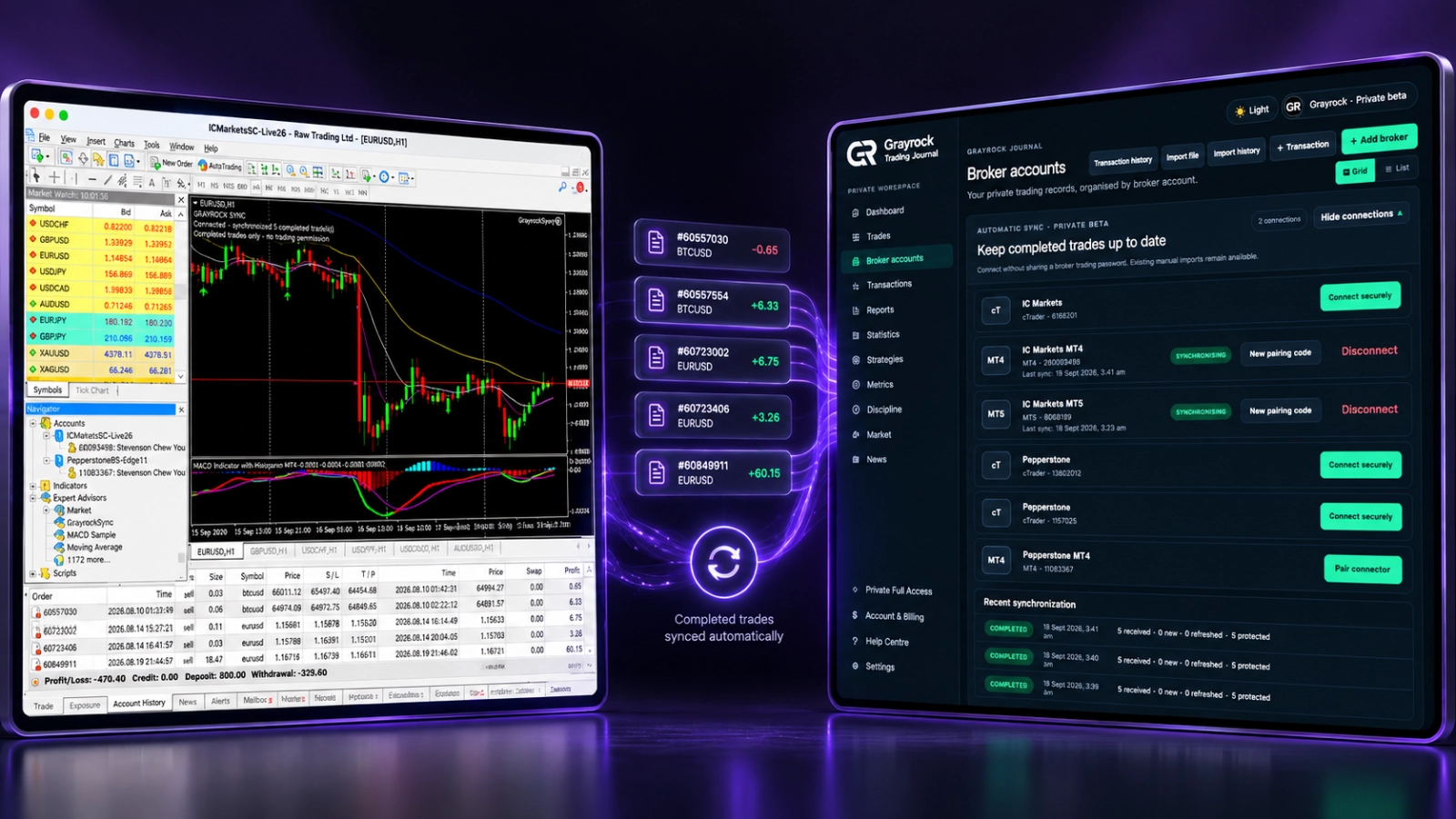
Connect Your Journal — Not Your Trading Authority.
Grayrock Sync is designed only to transfer completed-trade journal data. Your broker credentials and trading permissions remain inside MetaTrader.
No Broker Password
Your broker master or investor password is never requested.
No Trading Permission
Grayrock Sync cannot place, modify or close trades.
Secure Pairing
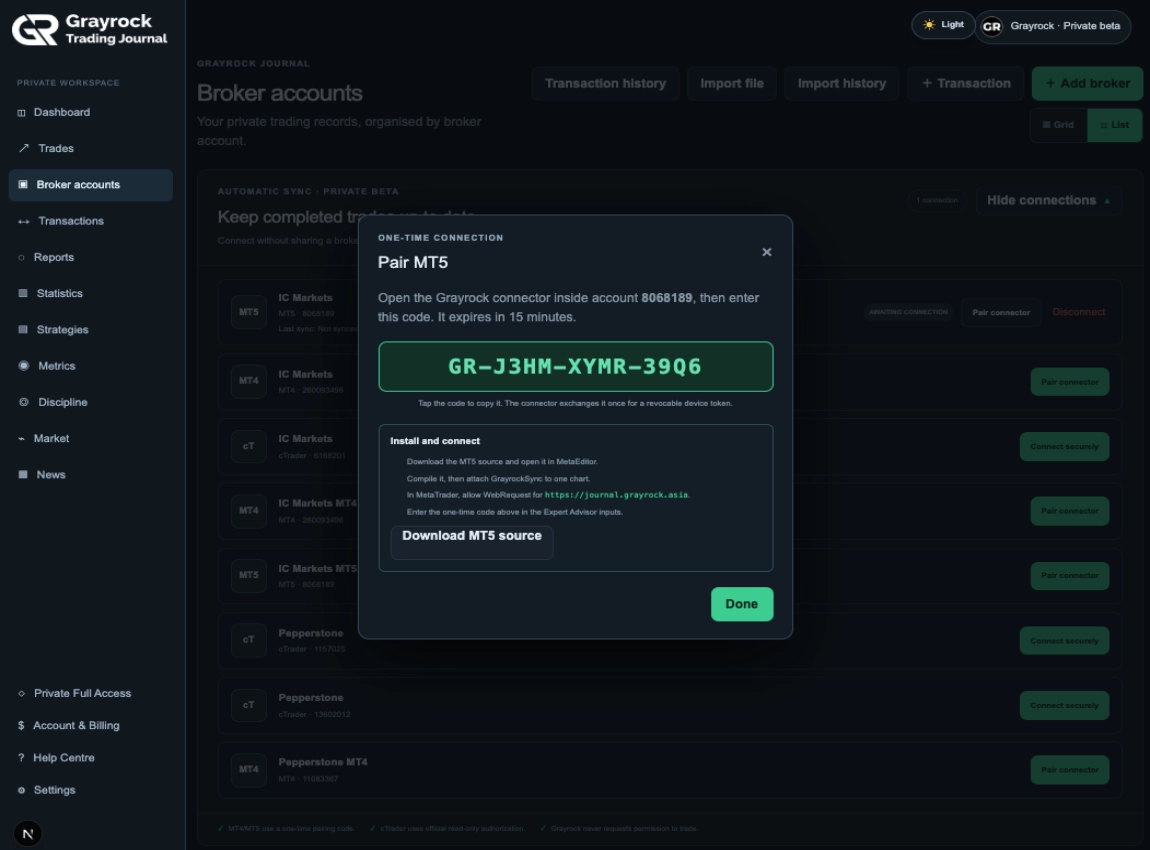
Connect with a short-lived, one-time pairing code.
Completed Trades Only
Synchronization is limited to completed-trade journal data.
Manual Records Protected
Synchronized trades are designed not to overwrite unrelated trades you entered manually.
Disconnect Anytime
Revoke the connector whenever you choose. Previously synchronized journal records remain available.
Trade First. Review with Complete Records Later.
Manual exports are easy to postpone and easy to forget. Grayrock Sync keeps your completed MetaTrader trades moving into your journal while the terminal is running, helping keep your statistics, reports and discipline review current.
One Secure Connection. No Broker Credentials Sent to Grayrock.
Grayrock Sync runs inside the MetaTrader terminal where you are already signed in. A secure pairing process connects your terminal to Grayrock without sending your broker password to Grayrock.
Add → Install → Pair → Sync
Your Trading Access Stays Inside MetaTrader.
Grayrock Sync runs locally inside your already authenticated MetaTrader terminal. Grayrock does not ask for your broker master password or investor password. The connector reads completed-trade history and sends journal data through an encrypted web connection.
- No order-placement functions
- No order-modification functions
- No position-closing functions
- Short-lived one-time pairing code
- Revocable connector token
- Manual journal records protected
- Completed-trade data only
Grayrock Sync can read completed trade history. It cannot trade on your behalf.
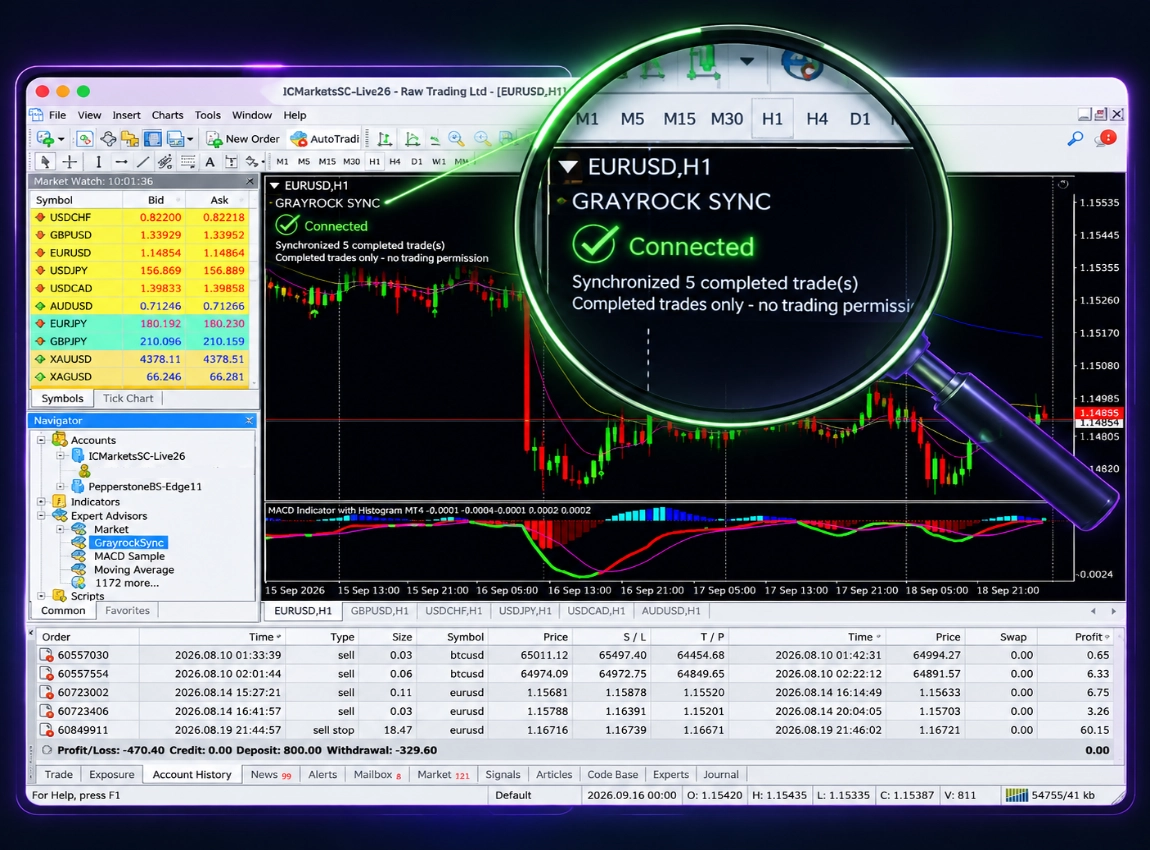
The Details Needed for Meaningful Review.
Depending on the records supplied by your broker and MetaTrader, Grayrock Sync brings the available completed-trade information into your journal.
- Broker account & platform
- Symbol
- Quantity / lot size
- Entry price & Exit price
- Entry time & Exit time
- Stop Loss & Take Profit
- Gross profit or loss
- Commission
- Swap
- Available fees
- Net profit or loss
- Comments
Grayrock Sync is designed for completed trades. It does not monitor or display open positions as a trading terminal.
A Journal Should Help You Analyse Decisions — Not Control Your Account.
Trading remains in MetaTrader. Grayrock organizes your completed results into statistics, strategies, reports, discipline insights and review workflows.
- Trade in MetaTrader
- Synchronize
- Review in Grayrock
Connect Your MetaTrader Terminal.
Grayrock Sync runs locally inside the compatible MetaTrader desktop terminal. Installation takes place through MetaEditor and the connector is attached to a chart in your logged-in terminal.
1. Download
Download the Grayrock Sync connector for your supported MetaTrader version.
2. Install & Attach
Compile the connector in MetaEditor, attach it to one chart and allow the required Grayrock web connection.
3. Pair & Verify
Generate a one-time pairing code in Grayrock, complete the connection and verify that your completed-trade history begins synchronizing.
MetaTrader desktop, an internet connection, the Grayrock connector attached to a chart, WebRequest permission for journal.grayrock.asia, and access to the relevant account history are required for synchronization.
Frequently Asked Questions
We know choosing the right software can raise a lot of questions. That’s why we’ve put together answers to the most common ones
Does Grayrock need my broker password?
No. Grayrock Sync runs inside the MetaTrader terminal where you are already logged in. Pairing uses a short-lived one-time code and never asks for your broker master password or investor password.
Can Grayrock place or change trades?
No. The connector is read-only by design. It contains no functions for placing orders, changing orders, closing positions or managing the trading account.
Which platforms are supported?
Grayrock Sync currently supports MetaTrader 4 and MetaTrader 5. Only advertise additional platforms after their production connection has been completed and verified.
Does it work with live accounts?
Yes. Grayrock Sync can journal completed trades from live or demo MetaTrader accounts, subject to the broker's terminal history being available.
Must MetaTrader remain open?
MetaTrader must be running for the connector to synchronize. When the terminal is closed, synchronization pauses. After MetaTrader is reopened, the connector resumes and catches up with completed trades available in the account history.
How frequently are trades synchronized?
The connector normally checks for newly completed trades every 60 seconds while MetaTrader is running.
What happens after I restart my computer?
The connector securely reloads its saved connection when MetaTrader reopens the same account, chart and profile. No new pairing code is normally required.
When would I need a new pairing code?
A new code is required after disconnecting the account, deleting the saved connector state, moving to another computer or MetaTrader data folder, switching accounts, or intentionally resetting the saved connection.
Can I disconnect it?
Yes. Disconnecting in Grayrock revokes the connector token. Previously imported journal records remain available.
Will synchronized trades overwrite my manual journal entries?
Grayrock protects manual records. Synchronized trades use their connection and external trade identifiers so that repeated syncs remain consistent without replacing unrelated manual entries.
Are open trades synchronized?
No. Grayrock Sync is intentionally focused on completed trades for journaling and performance review. It is not an open-position monitor or execution platform.
Will it continue syncing if the browser is closed?
Yes. The Grayrock web page does not need to remain open. MetaTrader and the connector must remain running and connected to the internet.
Stop Exporting Yesterday's Trades by Hand.
Connect MT4 or MT5 once and keep your Grayrock journal ready for the review that matters.
Desktop MetaTrader and the Grayrock connector must run for synchronization to occur.
 한국어
 English
 简体中文
 繁體中文
 日本語
 Bahasa Indonesia
 Tiếng Việt
 Español
 Português do Brasil
 Nederlands